| How to turn off the browser's pop-up blocker? |
| For Mozilla Firefox browser |
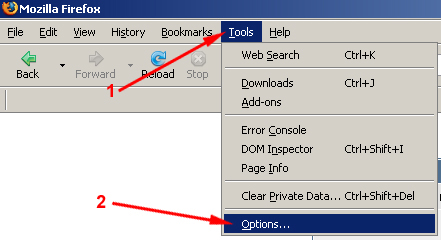
Step 1: Place your mouse pointer on the menu bar of the browser and click on the 'Tools' Menu.
Step 2: Select 'Options' from the sub-menu. |
 |
|
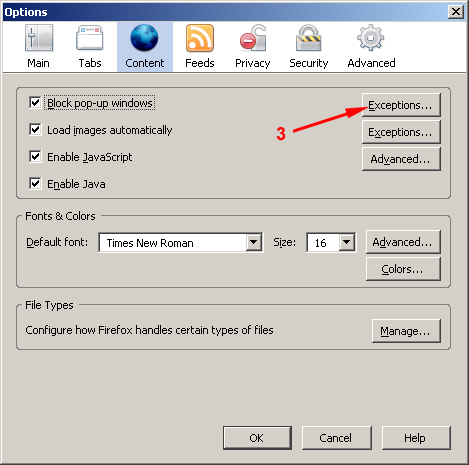
Step 3: If block pop-up windows checkbox is checked, click 'Exceptions...' button.
|
 |
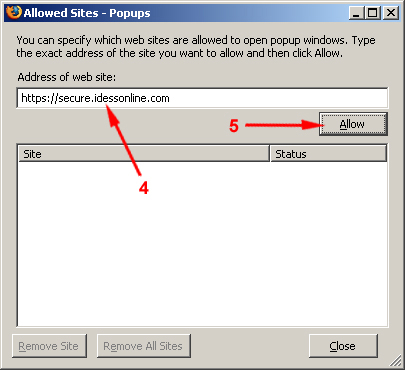
Step 4: Type the web site's url address.
Step 5: Click allow button.
|
 |
For Microsoft Internet Explorer |
Step 1: Place your mouse pointer on the menu bar of the browser and click on the 'Tools' Menu.
Step 2: Click 'Pop-up Blocker Settings'. |
 |
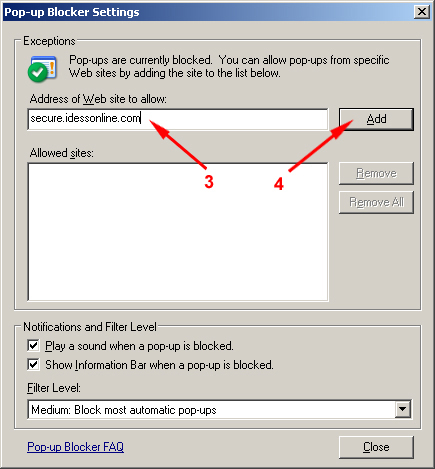
Step 3: Type the web site's url address.
Step 4: Click 'Add' button then click close to close the window.
Note: You can also turn off the Pop-up blocker by clicking the 'Turn Off Pop-up Blocker' under Pop-up Blocker Menu. |
|
Copyright © IDESS Interactive Technologies (IDESS I.T.) Inc. All Rights Reserved.
|